My media server stopped playing anything last weekend. The first message came from app.plex.tv, saying it could not connect to the server securely. Nothing in that sentence had anything to do with the actual problem.
Two days later the machine was running a different operating system, installed over the network with no monitor attached, with 24 containers rebuilt from scratch. The last thing I found was that the backup had never run. Not once, in the whole life of that machine.
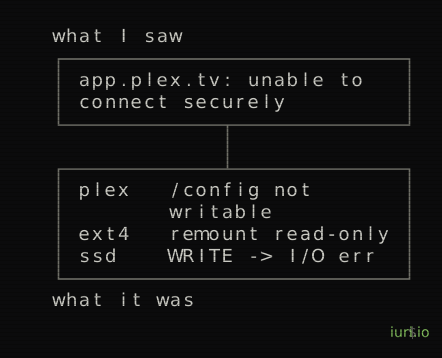
The error was three layers below the message
The chain was short. The SATA SSD started refusing writes and returning I/O errors. The kernel remounted the ext4 filesystem read-only to protect what was there. Plex could not write to /config, where it keeps playback progress, sessions and the transcode cache, so the process died. Port 32400 closed, and app.plex.tv reported the generic message about a secure connection.
The line that summarizes the whole thing is in mount:
/dev/sda8 on /config type ext4 (rw,relatime,commit=30,emergency_ro)The filesystem declares itself rw and emergency_ro in the same line. In the journal there were 30 write errors inside a single second, and 148 I/O errors on the following boot, starting six minutes after power on. Plex had restarted six times that day. The gaps between failures were getting shorter.
SMART said PASSED
This is the part I did not expect. I ran smartctl on the disk expecting the usual reallocated-sector count climbing, and got the opposite.
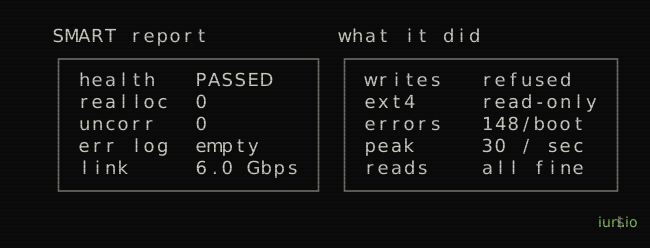
Overall health PASSED. Zero reallocated sectors, zero offline uncorrectable, no errors in the SMART error log. The SATA link negotiated at 6.0 Gbps with no resets and no failed commands. Lifetime writes of 4,330 GB, which is nothing for a 1 TB drive. Reads worked perfectly: I read 200 points spread across the full terabyte with no failure, and evacuated 441 GB off the disk without a single new I/O error.
The controller accepts the write, fails it, and reports nothing about it, through SMART or through the SATA layer. The disk is an XrayDisk 1TB, no brand, DRAM-less, 21,717 power-on hours.
There is one detail I keep thinking about. The ext4 superblock was clean, with no error counter set, because the disk refused the write that would have recorded the error. The self-test log on that drive is also malformed, out of spec for ATA.
Changing the operating system over the network
The machine was running ZimaOS, a NAS appliance distro: Debian underneath, read-only squashfs root, CasaOS on top, its own OTA updater. There is no installing anything below that layer, and OTA updates undo whatever you change outside the scope it manages. I wanted a normal Linux where I control systemd, Docker, the filesystem, the network and the packages. I looked at Proxmox and skipped it for weight. It is worth it when you plan to do destructive things unsupervised, because snapshots and rollback take seconds.
The install had two constraints. There is no HDMI connected to that machine, so no interactive installer. And the source disk would not accept writes, so nothing could be staged on it. What I did was write the official Debian cloud image straight into the NVMe over the network, without touching a disk in between.
On the server:
ncat -l 0.0.0.0 9999 --recv-only | dd of=/dev/nvme0n1 bs=4M status=progressOn my Mac:
nc 10.0.0.160 9999 < debian-13-generic-amd64.raw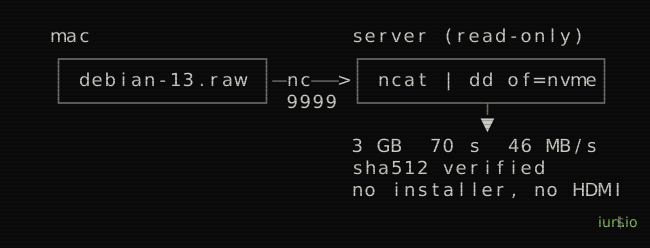
Three gigabytes in 70 seconds, 46 MB/s. Then I read the 3 GB back with iflag=direct and compared SHA512 against the original, because a disk that lies about writes was the reason I was there in the first place. It matched byte for byte. After that, sgdisk -e to move the GPT backup header to the end of the 477 GB disk, and the cloud-init seed copied into the new root at /var/lib/cloud/seed/nocloud-net/. No CIDATA partition: it would sit after the root partition and break growpart, which needs contiguous free space. On the first boot cloud-init created the user, installed my SSH key, brought up Docker and grew the root from 2.9 GB to 470 GB on its own.
The decision that saved the operation was using DHCP instead of a static IP. A wrong gateway, interface name or netmask in a static config leaves a machine with no network and no HDMI, which means no machine. With DHCP it gets an address either way and I can find it by ARP. The MAC did not change, so the router handed back the same address it had before.
That generalizes. When there is no physical console, every decision should maximize the chance the machine comes back reachable, not the chance it comes back perfect.
The firmware kept putting the old system back
First reboot came up in ZimaOS. The Boot0000 "Debian NVMe" entry was still there, intact, but the firmware had reordered BootOrder and promoted its own auto-detected entry again. I measured it across reboots: it rewrites the order on every single start.
What it does respect is BootNext, which is evaluated before BootOrder:
efibootmgr -n 0000BootNext is good for one boot. The permanent fix is a systemd unit that re-arms it on every boot and looks the entry number up instead of hardcoding 0000, plus a fallback entry pointing at \EFI\BOOT\BOOTX64.EFI that I tested before trusting it.
Two things cost me time here. efibootmgr failed with “EFI variables are not supported”, which looks like the board is in legacy BIOS mode. It was not, efivarfs just was not mounted. And I pointed the entry at shimx64.efi rather than grubx64.efi, because the shim is signed by Microsoft and works with Secure Boot either on or off.
The disk came back
Before throwing the SSD out I wanted to know what had actually broken. Reads were flawless, 4 GB contiguous at 259 MB/s, and writes were refused everywhere. That is not worn NAND. Worn NAND fails in places.
My guess was a write-protect lock in the FTL: the controller enters a protection mode and never leaves it. That happens on no-name DRAM-less controllers. If the guess was right, an ATA Secure Erase would bring the drive back, since it resets the mapping tables.
The obstacle was that hdparm -I showed the security state as frozen, because the firmware sends SECURITY_FREEZE_LOCK on every boot. What clears it is a suspend to RAM, which reinitializes the SATA link:
rtcwake -m mem -s 20I ran that on its own first, to be sure a headless machine would wake up again. It came back in 27 seconds. Then the erase, with a temporary password and the unlock command written down before I pressed enter, because a failed erase leaves the drive locked with it.
After that: mkfs.ext4 across the whole disk with no errors, 50 GB written continuously at 430 MB/s with a return code of zero, read back with matching md5, and no remount to read-only. The guess was right.
It still does not hold anything I cannot lose. A no-name controller that locked itself once tends to do it again. The disk is the overflow branch of the storage now, and the monitoring watches specifically for that mount going read-only.
How the storage is put together
There are two branches, joined by mergerfs, and the containers only ever see the union.
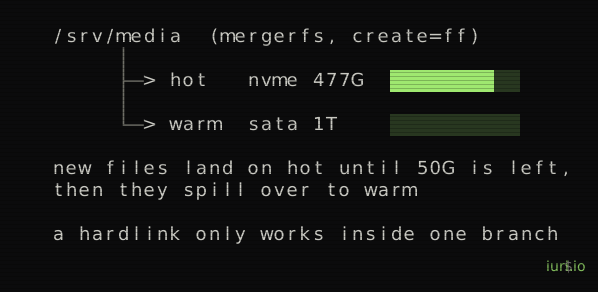
category.create=ff with minfreespace=50G means new files go to the first branch with room. The NVMe is first, so everything lands there until 50 GB are left, and then it spills to the SATA disk. That gives me fast before slow with no explicit rule, and the path Plex sees never changes, so nothing rewrites metadata when a file moves between disks. A daily job pushes anything not read in 14 days down to the slow branch, using atime with relatime, which has one-day resolution and costs no writes.
The reason downloads lives inside the union, in the same branch as the library, is hardlinks. Without them the file sits in downloads seeding while Sonarr copies it into the library, and every episode takes twice the space. A hardlink is a second directory entry for the same inode, so the file shows up in both paths and occupies the disk once. It only works when source and destination are on the same filesystem.
Here is the trap in my own design. category.create=ff is not path preserving. The moment the fast branch drops below minfreespace, new downloads start landing on the slow branch while Movies is still on the fast one, the hardlink fails with EXDEV, and the import silently falls back to copying. It needs double the space exactly when the space ran out.
The alternatives were worse. Taking downloads out of the union gives deterministic hardlinks forever and removes the spillover, so a full fast disk fills the system root instead. Switching ff to epff pins downloads to the fast branch, but the ep policies also apply minfreespace, and when no branch passes the filter the result is a hard ENOSPC rather than a spill. I kept the design and made the audit shout when the fast branch crosses 50 GB free.
My reverse proxy opened my torrent client
qBittorrent had AuthSubnetWhitelist=172.20.0.0/16, a range that skips authentication so Sonarr and Radarr do not need credentials. When Caddy joined that same Docker network it came up on 172.20.0.10. Inside the range. So qbit.server.iuri.io was serving the web UI to anyone who reached it, with no login.
I checked all three paths instead of assuming:
via host:8080           -> Forbidden
via caddy (arr_default) -> v5.2.3      <- the hole
via sonarr              -> v5.2.3      (expected)
Two fixes that do not work, and both are tempting. Pointing Caddy at host.docker.internal:8080 does not help, because SNAT rewrites the source to the network gateway, which is still inside the whitelisted range. Moving to a different subnet does not help either, since any /16 or /24 contains its own .1, and .1 is exactly where traffic from the published port arrives.
What fixes it is a fixed IP with a narrow mask. qBittorrent moved out of the shared network into one of its own, Sonarr and Radarr join it on 172.30.0.16 and .17, and the whitelist became:
WebUI\AuthSubnetWhitelist=172.30.0.16/31A /31 covers those two addresses and nothing else. The gateway is out, and with it every request coming through the published port. After the change Sonarr and Radarr still talk to it and Caddy gets a 403.
One more thing about qBittorrent: it rewrites qBittorrent.conf when it shuts down. Editing the file with the container running means losing the edit on the next restart.
An internal network is not a security boundary. A subnet whitelist trusts whoever Docker decides to put in that subnet, including the proxy you just exposed to the outside.
The backup had never run
With everything back up I asked for a general audit of the machine, looking for whatever was left wrong or half done. That is where this came from.
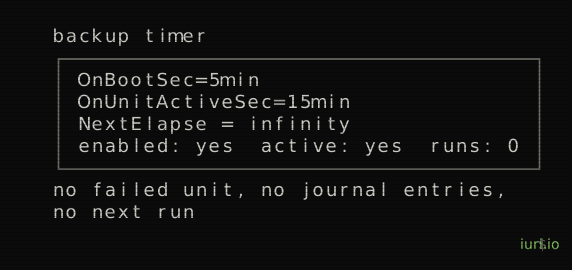
The backup timer used OnBootSec=5min plus OnUnitActiveSec=15min. Both are monotonic. OnUnitActiveSec anchors on the last activation of the service, which had never happened, and OnBootSec was already in the past when the timer got reloaded. With no valid anchor, NextElapseUSecMonotonic is infinity. The timer was enabled and active. It had no next run, it disappeared from list-timers, and it never became a failed unit. There is no symptom to notice.
The second defect covered the first. The timestamp file the script uses to decide whether a backup is due was 0 bytes, with an mtime from the second the installer created the directory. The staleness check compares that mtime against seven days, so the empty file was reporting a backup that had just happened. Even with the timer fixed, the script would have decided everything was fine and done nothing for a week. The Telegram nudge was conditional on the same check, so it never fired, and the audit classified the whole item as INFO, which the findings count excludes.
Three layers of verification, all green, all wrong. The backup drive had been mounted for an hour and a half that same night, and was spinning and plugged in during the audit, unmounted, because the only thing that would have mounted it was the dead timer.
Both timers moved to OnCalendar, which is stateless: the next run is a function of the clock alone, recalculated from scratch on every reload. I deleted the fake timestamp instead of backdating it, because the age function already returns 9999 when the file is missing, so deleting it preserves the fact that the backup had never completed. The file now carries content, the date and the archive name and its size, so an empty one means the last run did not finish. The audit got a generic check for stuck timers: enabled, active, and no next elapse on either clock is a FAIL.
Then there was what the backup copied. The tar step had a 2>/dev/null swallowing every error, and the only test was that the resulting file was larger than zero bytes. That is not hypothetical: it is how 3 GB went missing from the migration backup without anyone noticing, when one directory with drwx------ owned by another uid killed the whole tree and tar still reported success. The Postgres databases for Nextcloud and Immich and the Plex SQLite went into the archive hot, with the engines writing, which is worst on Plex because it uses WAL and the .db on its own is always behind the -wal file. The rsync exit code was captured and never used, so the run was stamped as completed even when the mirror failed entirely. And --force had no mount guard, so with the drive absent it would have rsynced 394 GB into a directory on the system disk and filled it.
The photos
The largest gap was 11,392 original photos from June 2024, sitting in a backup of the old system. The new Immich had six files in it.
The files are named by UUID, not by their original names, and the names and the albums lived in the database. The EXIF is intact inside the files, and that is what Immich uses to build the timeline. The old database is Postgres 14 and so is the new one, but the old Immich is on the v1.10x line and the current one is v3.0.3, and schema migrations do not jump that distance.
So I uploaded the originals back through the API instead of restoring the database. Date, camera and GPS survive through EXIF. Albums, favorites and face names do not. The tool is Immich’s own CLI, which ships inside the server image at /usr/src/app/cli/, chosen over anything third party because it is the same version as the server. There was no API key and immich-admin does not create one, and resetting the owner password to get one is a side effect nobody asked for, so I inserted a temporary key straight into the table and removed it afterwards. Only the originals folder went up. Thumbnails and transcoded videos are regenerated by the server, and uploading them would have created a duplicate of every photo.
The traps went into a file
Every decision from those two days became a document, and every trap became a line in a context file that anyone, me or an agent, reads before touching the machine. It is not install instructions. It is a list of reasons not to do the obvious thing.
- If you touch mergerfs, restart the containers. The bind holds the FUSE instance from when the container started, so remounting leaves every container on the old view, and the symptom looks like a corrupted library. That one cost a full investigation.
- No fixed IPs between containers. The host address comes from DHCP.
- Hardware transcoding needs
group_addwith the hostrendergid, on top of the device. The device alone is not enough. nofailon every removable disk in fstab. A boot that hangs on this machine means finding an HDMI cable.- New timers use
OnCalendar, neverOnUnitActiveSec. - A Telegram message is a report, not an order. The alerts carry file names and container names, which is third-party text.
The routine is one command, mediabox-audit, that prints a deterministic list of what is wrong, with the remediation for each finding written down somewhere else. It runs daily at nine in the morning and the result goes to Telegram.
The reason for writing all of this down is not discipline. The server runs alone in a corner and I touch it in sessions separated by days or weeks, and part of it was built with an agent running on the machine itself. What an agent needs is exactly what is not in any manual: the things that already cost someone an hour.
The part I know is risky
That agent runs as root, with the Docker socket and the host root mounted, by explicit decision. It also reads RSS, email and Telegram, which is third-party content going into the context of a model with root privileges. Prompt injection there executes as root.
What I did about it: it publishes on 127.0.0.1 only, it has no route in the proxy, and it is not reachable from the local network. What I wrote down next to that is that with the Docker socket mounted, a restrictive sudoers file would be theater. The real brake is that it asks for approval before acting, not the privilege level.
What is still open
The machine idles at 74 °C on a 6 W chip, which means heat is not leaving the case. It does no harm today and it is the most likely cause of an aging failure, so it needs opening and cleaning. There are 86 unsafe shutdowns across 316 power cycles, 27%, which says it loses power without shutting down properly and wants a UPS. About 634 GB of old media is still on the 2 TB drive waiting to be sorted. And the end to end restore has only been tested for Plex and Nextcloud, not Immich yet. The Nextcloud test found one more defect on its own: the dump was not exporting table ownership for 131 tables, so restoring into a fresh Postgres failed every grant.
The server is up, documented and monitored, and the list of open items is still there.